· 7 min read
WordPress Security Update: Is Your Site Safe on 7.1.5?
Two WordPress security updates landed in three weeks, and attackers used a flaw fixed in the first. Here is how to check your site is on 7.1.5 and what to do if it is not.
WordPress has put out two security releases in three weeks, and this is one WordPress security update you should not leave to chance. The first, version 7.1.4 on 28 October, fixed a flaw that attackers were then caught using against real websites. The second, version 7.1.5 on 18 November, fixed another 20 security issues, several of which can be attempted by someone with no login at all.
If your business website runs on WordPress, the question is simple: is it on 7.1.5 (or the patched version for your branch) yet? Most sites will have updated themselves. Some will not, and those are the ones attackers look for. Here is what happened, how to check in two minutes, and what to do if your site is behind.
What happened in October and November
WordPress 7.1.4: a flaw in the update process itself
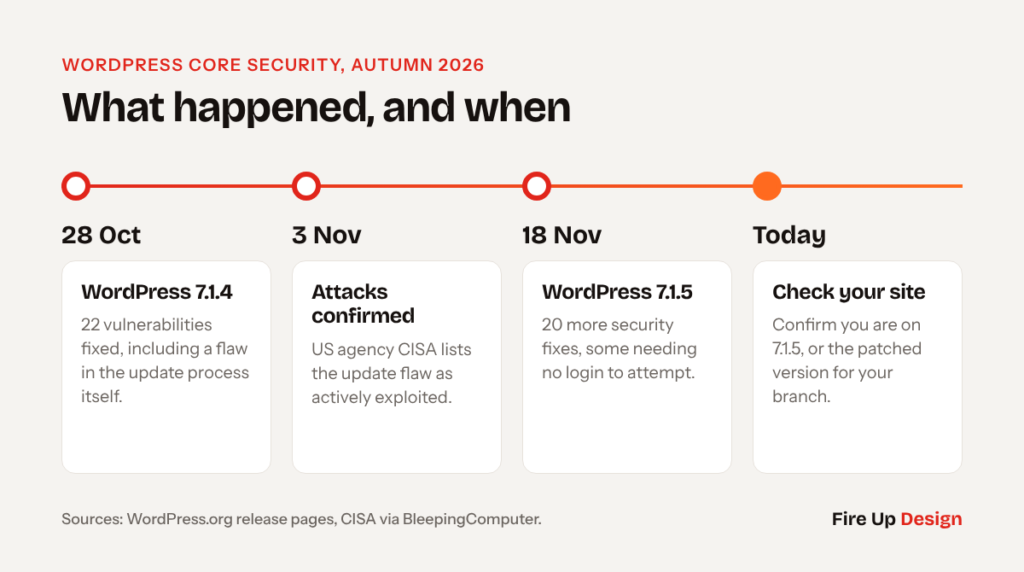
According to the official WordPress 7.1.4 release page, the update came out on 28 October 2026 and WordPress recommended that everyone update immediately. Security firm Patchstack counted 22 vulnerabilities across 17 advisories.
The most unusual one was a race condition during core updates that could lead to remote code execution. In plain terms: while WordPress was unpacking an update, it briefly left files in a temporary folder with a predictable name. Someone who requested those files at exactly the right moment could run their own code on your server, without needing an account. Patchstack described the window as tiny, but pointed out it reopens every time the site updates, including automatic updates.
“Hard to pull off” did not mean “never happens”. On 3 November, the US Cybersecurity and Infrastructure Security Agency (CISA) added the flaw, tracked as CVE-2026-119977, to its list of vulnerabilities known to be exploited in real attacks, as reported by BleepingComputer. The same report says Wordfence blocked 13,095 attacks aimed at this flaw in a single 24 hour period. CISA is a US agency, but the websites being probed are everywhere, including small UK business sites.
WordPress 7.1.5: 20 more fixes
Three weeks later, on 18 November, WordPress 7.1.5 was released, again with advice to update immediately. Patchstack’s analysis counts 20 fixes: 18 vulnerabilities plus two hardening changes. The ones most relevant to a typical business site are:
- A privilege escalation that starts with an anonymous visitor. Through a flaw in how a block handles its settings, an attacker could plant content that, once an editor opens it, could hand them administrator powers and potentially full control of the site.
- A database (SQL injection) flaw that needs no login. This kind of bug can let an attacker read information from your site’s database.
- Malicious code planted through comments. Patchstack notes this needs a page showing the Latest Comments block.
- A way to overload a site through XML-RPC pingbacks, an older WordPress feature many sites never use.
- Several issues that need a logged-in user, such as a contributor or author, to abuse. These matter if you have staff, freelancers or old accounts with access to your site.
At the time of writing, none of the sources we checked reported attacks using the 7.1.5 issues. Given what happened with 7.1.4 within a week of release, we would not wait to find out.
Will my site install the WordPress security update by itself?
Probably, but do not assume it. By default WordPress installs minor and security releases automatically in the background. That has been the case since WordPress 3.7. Patchstack confirms sites with automatic background updates will pick 7.1.5 up on their own.
The catch is that automatic updates can be switched off, sometimes without the owner knowing. Common reasons include:
- A developer turned them off in the site’s configuration file to stop updates breaking a custom theme or plugin.
- A setting that blocks all file changes, often added for security, which also blocks updates.
- The site is managed through version control, which WordPress detects and treats as a reason not to update itself.
- The host manages updates itself and has not applied this one yet.
In most of these cases the owner has no idea, because the site looks perfectly normal from the front.
How to check your WordPress version
Checking whether your site has the latest WordPress security update takes about two minutes:
- Log in to your WordPress dashboard.
- Go to Dashboard then Updates. The page tells you which version you have and whether a newer one is available.
- Compare your version with the table below. The current version is 7.1.5. If your site is on an older branch, WordPress has released a patched version for it too.
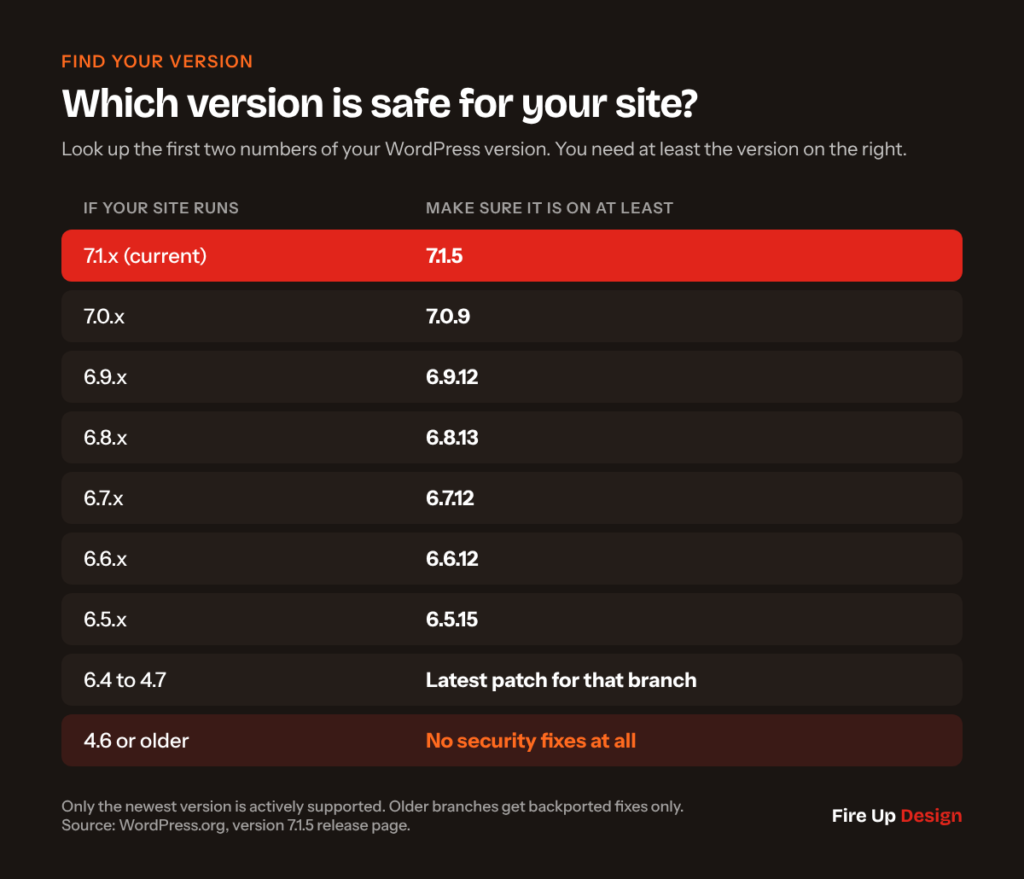
A note on older versions. WordPress backports security fixes to old branches, all the way back to 4.7, but the release page is clear that only the most recent version is actively supported. WordPress 4.6 and earlier gets no security updates at all. If your site is several versions behind, that is usually a sign it has not been maintained, and plugins and themes are likely to be out of date too.
What to do about this WordPress security update
- Check your version today using the steps above. If it says 7.1.5, your site already has the latest WordPress security update.
- If it is behind, take a backup, then update. Most hosts include backups, but make sure you have a recent one you can actually restore before you click update.
- Check the site afterwards. Look at your home page, contact form and, if you sell online, the basket and checkout. Our guide to what to do when WordPress updates break your site covers the most common problems.
- Find out why it did not update itself. If automatic updates are off, ask whoever built or hosts the site why. There is sometimes a good reason, but then someone needs to be updating by hand, promptly.
- Tidy up user accounts. Patchstack recommends reviewing who has contributor access or higher. Remove old staff, past freelancers and accounts nobody recognises. Several of the 7.1.5 fixes only matter if an attacker has a login.
- Update plugins and themes too. These two releases were about WordPress itself. Plugins and themes have their own updates, and an out of date plugin is just as much of an open door. Our guide to keeping your WordPress site secure from common threats covers the basics.
If you have a developer, it is worth asking them one extra question: whether web access to the temporary wp-content/upgrade/ folder is blocked. Patchstack recommends this as an extra layer of protection against the 7.1.4 style of attack.
Frequently asked questions
Do I need to do anything if my site updates automatically?
Just confirm it has worked. Log in, go to Dashboard then Updates, and check the version number. If it shows 7.1.5 (or the patched version for your branch), there is nothing more to do for these releases.
Will updating WordPress break my website?
Minor security releases like 7.1.4 and 7.1.5 are designed to fix problems without changing how your site works, so they rarely cause trouble. Take a backup first anyway, and check your key pages afterwards.
My site was built years ago and never updated. What now?
Do not try to jump several major versions in one go on the live site. Take a full backup, and ideally test the update on a copy of the site first. If plugins or the theme are also years out of date, this is a job for a developer, as some may no longer be supported.
How would I know if my site had already been hacked?
Signs include unfamiliar administrator accounts, pages or links you did not add, redirects to other websites, warnings in Google Search or your browser, or an email from your host. If you see any of these, get help before you start deleting things, as you need to find how the attacker got in.
Does this affect WooCommerce shops?
Yes, if the shop runs on WordPress, which every WooCommerce shop does. The fixes are in WordPress itself, so update WordPress first, then check WooCommerce and your other plugins for updates too.
Want someone else to keep on top of this?
Two security releases in three weeks is a lot to track when you are also running a business. Our hosting and care plans include WordPress updates, backups and checks, so you do not have to think about it. If you are not sure whether your site is up to date, get in touch and we will take a look.