October 21, 2025 · 4 min read
Why Your WordPress Site Is Loading Slowly (And How to Fix It)
A slow WordPress site usually comes down to a handful of fixable causes, not a full rebuild. See what to check first and how to speed it up.
There’s nothing more frustrating than clicking a link and watching the page crawl open bit by bit. If you run a WordPress site, you’ve probably dealt with this already. A slow site doesn’t just test patience: it turns visitors away, hurts trust, and can make a business look less credible than it is. It also affects how search engines rank you, pushing you further down the results.
Speed problems aren’t just about heavy graphics or video. Even a simple blog can load slower than it should. Whether your site is brand new or years old, performance issues tend to creep in quietly. The good news is that most of them are fixable, once you know what’s actually causing the slowdown.
Common Causes of Slow WordPress Sites
Slow-loading sites usually suffer because a few basics haven’t been handled properly, not because of one single dramatic issue.
Here are some typical culprits:
- Poor hosting setup
- A crowded or low-tier server can struggle with even light traffic
- Proper hosting is worth getting right from the start
- Too many plugins
- Stacking plugins, especially outdated or unused ones, drags a site down
- Outdated plugins are a security risk too
- Unoptimised media files
- Large, uncompressed images or video slow every page load
- Heavy themes
- Feature-packed prebuilt themes often carry extra code and third-party scripts you never asked for
- Lack of caching
- Without it, the site reprocesses every page for every visitor
Picture a site running a free theme with sliders, animations, and a dozen plugins for simple tasks. On a fresh install it might run fine. Add a few pages, some contact forms, and high-resolution images, and every click starts coming with a wait.
How to Identify Speed Issues
Knowing your site is slow is one thing. Knowing why takes real tools, not guesswork. Start with:
These give clear reports on load time, page size, number of requests, and Core Web Vitals: how quickly content appears, how interactive it is, and whether anything shifts around as it loads.
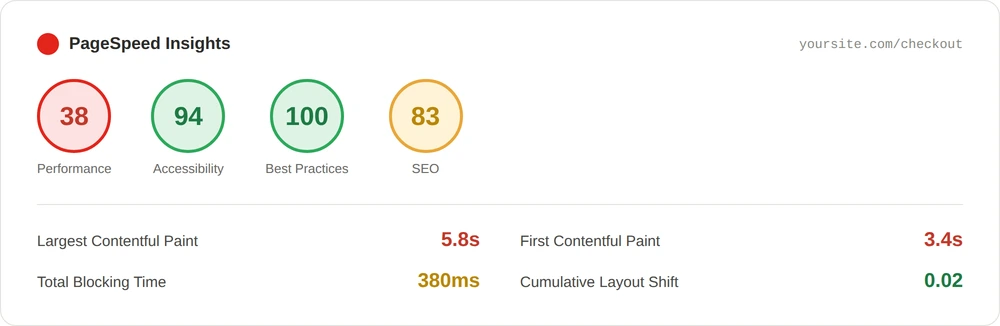
Worth testing your plugins directly too: disable them one at a time and re-test after each. If the site speeds up once a specific plugin’s off, you’ve found a contributor.
Steps to Improve Your Site Speed
You rarely need to rebuild the whole site. A handful of focused fixes usually make a real difference:
- Optimise images
- Compress before uploading, and use WebP where you can.
- Enable browser caching
- This lets returning visitors load pages faster.
- Minimise HTTP requests
- Trim excess scripts, fonts, and third-party embeds.
- Use a CDN
- Serves files from a server closer to each visitor.
- Limit external elements
- Host media internally where possible.
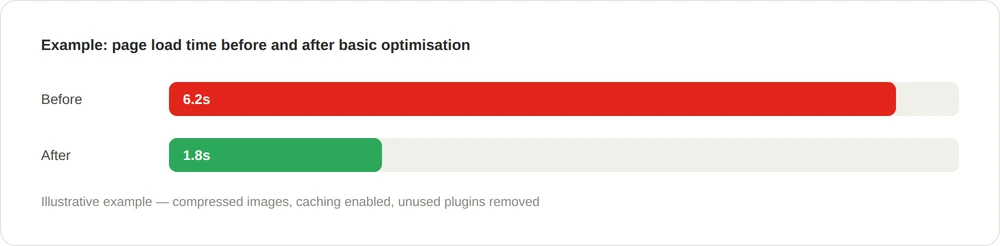
Apply one fix at a time and test after each, so you know what’s actually moving the needle rather than changing five things at once and hoping. Check mobile separately too: a site that loads fine on desktop but drags on mobile usually points at images or layout that were never built with smaller screens in mind.
When the Basics Aren’t Enough
If you’ve worked through all of this and the site still feels sluggish, the issue may be structural rather than surface-level. Off-the-shelf themes and page builders often carry far more code than a given site actually needs: features running in the background whether they’re used or not. In that case, bespoke WordPress development strips a site back to exactly what it needs: cleaner code, fewer plugin conflicts, and a structure built around your actual business rather than a generic template.
hat also cuts down on the kind of conflicts that cause a site to break after an update in the first place.
When Your Website Finally Feels Fast
When a site loads properly, it changes how people interact with it. Pages appear. Buttons work first time. Forms don’t hang after submit. Those small things build trust, and a fast site simply feels more dependable.
You don’t need to chase every plugin update or trend to keep a WordPress site running well; you need to understand what’s actually slowing yours down and fix it deliberately. If your site’s speed has been bothering you, that’s worth acting on sooner rather than later. It affects how your business is remembered, and whether visitors stay or leave.