
October 21, 2025 · 5 min read
What To Do When Your Website Design Isn’t Mobile-Friendly
Small text, tight buttons, slow images: a site that is not mobile-friendly usually shows clear signs. See what to check and how to fix it.
A mobile-friendly website isn’t just a nice feature anymore. It’s something people expect. In the UK, more web traffic now comes from phones than desktops, once you filter out bot traffic to see how real people actually browse. When someone visits your site on their phone, they want it to work just as smoothly as it does on a laptop. If it doesn’t load quickly, buttons are hard to tap, or they have to keep zooming in to read text, most won’t stick around. That means fewer leads, fewer sales, and a weak impression of your brand.
Beyond user experience, mobile design also affects how search engines treat your site. If your pages aren’t set up to work on mobile, you could be pushed down in rankings, especially if others in your niche have already made improvements. So if your site isn’t mobile-friendly, or you’re not sure whether it is, now’s the time to take a closer look. Here’s what to check and what actions to take.
Identifying Mobile-Friendliness Issues
Before making any changes, it’s helpful to know what’s actually wrong. Several free online tools can scan your site and tell you if it works well on mobile. But the simplest starting point is using your own smartphone to test it yourself.
Try loading a few different pages on your mobile. Ask a few key questions while you do:
- Is the text readable without pinching or zooming?
- Do the buttons and links respond easily to your thumbs?
- Do images take too long to load or look oversized?
Some common signs your website may not be mobile-friendly:
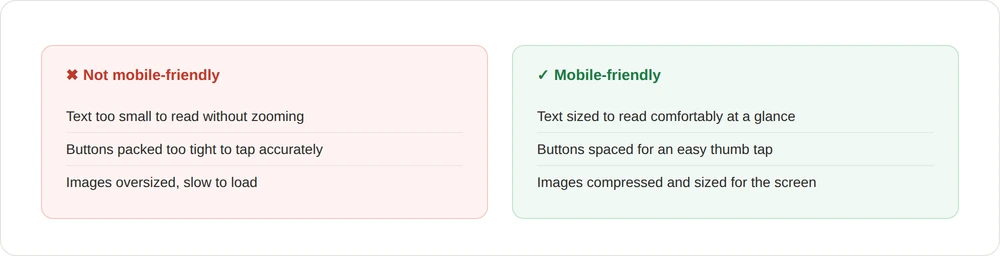
- Text that’s too small or doesn’t adjust to screen size
- Menus or buttons packed too tightly together
- Images that don’t resize or load slowly
- Content that spills off the screen or requires side-scrolling
- Pop-ups that block valuable information
- Navigation that’s confusing or cluttered
Picture a small local shop with a nice desktop site. When users visit on their phones, though, the checkout button overlaps the product photo, and the menu items are stacked in a tangled list. That hurts the user experience and drives people away.
Recognising these red flags early makes it far easier to address them effectively.
Immediate Fixes to Improve Mobile Compatibility
Once you’ve spotted the problem areas, it’s time to act. There are a few direct steps that can give your site’s mobile layout an instant boost.
Responsive design is the first one to focus on. This lets your website automatically adapt to any screen size, from tablets to phones. Layouts will shift, images will scale, and text remains easy to read. It’s one of the simplest ways to improve usability without creating a separate mobile site.
Other quick adjustments that can help:
- Use mobile-friendly fonts. Stick to clear, simple fonts that are easy to read on small screens; avoid thin or decorative typefaces that may blur or appear too small.
- Adjust buttons and links. Make sure they’re large enough for people to tap with their thumbs, with space between them to prevent accidental clicks.
- Optimise images. Compress files to speed up load times without losing quality, size them correctly for smaller displays, and write descriptive filenames and alt text.
- Simplify menus. Use dropdown or collapsible sections with clear labels rather than long vertical lists.
- Shorten content. Break longer paragraphs into bite-sized chunks, and use numbered or bulleted lists to make key facts easy to scan.

These steps sound small, but they have a big impact on the user journey. When visitors feel it’s easy to browse, they’re far more likely to stay on your site and take the next step. Search engines pick up on this improved experience too.
Advanced Solutions for a Better Mobile Experience
Once the basics are in place, you may want to explore more advanced design features to improve usability even further.
Navigation deserves extra attention. Long menus and bulky dropdowns don’t work well on smaller devices. Shift to tidy hamburger menus or fixed headers that follow users as they scroll. It makes the experience smoother without adding clutter.
Other touch-friendly features worth adding:
- Swipe functions for image galleries or sliders
- Tap-friendly accordion menus for FAQs
- Auto-dial links on your contact numbers
- Map previews that open in the user’s map app
For example, if you run a booking service, letting people select time slots by swiping through a calendar makes the process quicker and more pleasant. These additions improve not just usability, but also how likely your visitors are to complete tasks on your site.
Animation and interaction work too, but with care. What feels sleek on a desktop may cause glitches or delays on mobile. Always test any animations on multiple devices and focus on keeping performance smooth.
When to Seek Professional Help
You can make a few adjustments yourself, especially using built-in settings on your CMS. But if your changes aren’t delivering, or the problems are spread across many pages, that’s usually a sign it’s time to get support. A professional design service can do more than just patch things up: rebuilding the layout to be fully mobile-friendly, auditing the site for hidden bugs, improving site speed, and making sure your structure supports your brand and business goals.
Stay Mobile-Ready as Your Business Grows
Getting your website working well on mobile isn’t a one-off job. New phones, browsers, screen sizes, and design trends are always emerging. What worked perfectly last year might run awkwardly this year if it’s left untouched.
We recommend simple, ongoing check-ins. Every month or two, pull up your site on a few different devices and pay attention to load speed, layout, and anything that seems off. Catching those changes early keeps your visitors happy.
A good mobile experience reflects how much you care about your visitors’ time and ease of use. When browsing your site feels simple, fast, and stress-free, you build confidence, and that opens the door to more bookings, more sales, and stronger trust from your audience.
The longer your mobile site underperforms, the more opportunity you lose with visitors who don’t want to wrestle with shortfalls. If your changes aren’t landing, our website development team can rebuild it properly.