
· 3 min read
Ecommerce Holiday Planning: A Website Guide for Online Stores
Plan your online store’s holiday season, from delivery cut-offs to a change freeze. Get a checklist of what to test, update and agree before the rush.
: Rewritten for the 2026 season, with a change-freeze plan, holiday customer service tips, sourced checkout statistics and new graphics.
Most holiday problems on an online shop aren’t dramatic. A banner goes live a day late. The delivery cut-off on the product page doesn’t match the one in the checkout. A promo code that worked in testing fails on mobile.
None of that needs a big budget to avoid. It needs a plan that’s agreed early, with someone responsible for each part.
Start with the dates that matter to your shop
Black Friday falls on 27 November this year and Cyber Monday on 30 November. Your own dates matter more: the last day customers can order and still get gifts in time, and when you stop taking new promotions.
Royal Mail publishes its last posting dates for Christmas, so link to those instead of copying them, as they can change. Put your cut-off where customers will see it: on product pages and in the basket, not only on a banner.
Agree a change freeze
Pick a date after which only fixes go live. New features, plugin updates and redesigned pages all land before it. That includes the work you do in-house: a price change or banner swap on the Monday of Black Friday week is a change too.
A freeze won’t cover everything. Emergencies happen, so agree in advance who can approve one and how it’s tested first.

Test the parts that make money
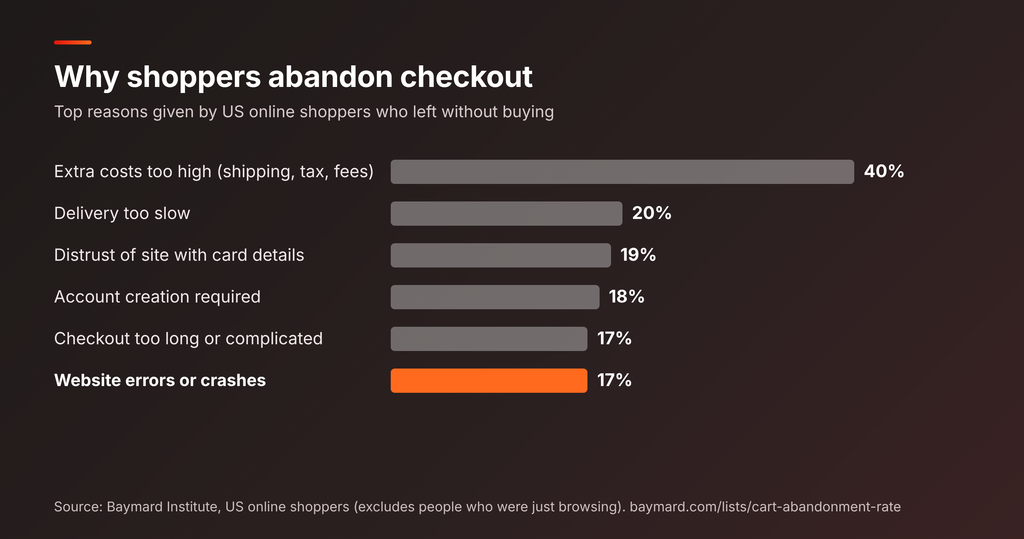
Checkout is where holiday traffic turns into sales, and where problems cost the most. Baymard’s review of 50 published studies puts the average documented cart abandonment rate at 70.22%. In their research with US shoppers, 17% of people who abandon a cart cite website errors or crashes, and 40% cite extra costs such as shipping and fees. That’s US data, but it shows what to check first.
Before the freeze, run through the full checkout on mobile and desktop:
- every payment method you offer, including a failed payment
- discount codes, gift cards and sale prices together
- delivery options and costs for each region you ship to
- stock levels updating after an order
Do plugin and theme updates early, ideally on a staging copy first, so you have time to watch for knock-on problems. If something does break, our guide to fixing a shopping cart that keeps crashing covers where to look.
Make sure the site holds up when traffic jumps
Run your busiest pages through Google PageSpeed Insights now, not during the sale. A faster page won’t help if your hosting plan is already at its limit, so ask your host what happens during a traffic spike. For the Black Friday side of this, see our Black Friday and Christmas website checklist.
Answer holiday questions before customers ask them
Many holiday emails ask the same few things: will it arrive in time, what are your opening hours, can I return a gift. Put the answers where people are already looking:
- Delivery cut-off dates on product pages and in the basket
- Holiday opening hours and support response times
- A gift returns policy that’s easy to find
- An auto-reply on your contact form and inbox that states the above
If you have a physical shop, update the holiday hours on your Google Business Profile too.
Plan for January as well
The season doesn’t end on Christmas Eve. Returns arrive, stock needs recounting and sale banners need to come down. Leaving expired offers live confuses customers and search engines. Schedule the clean-up now, along with a note of which landing pages you’ll keep for next year.
Where a developer fits in
A developer’s job in this period is mostly checking: testing, backups, rollback points and watching for problems once traffic arrives. If you’d like a second pair of eyes on your checkout before the rush, talk through your store with us.